








































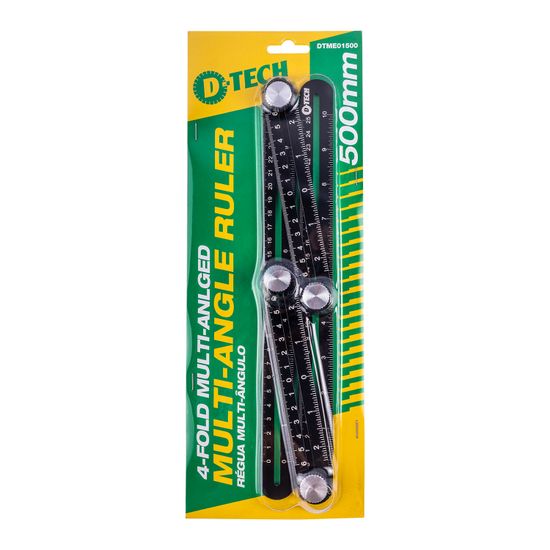
D-TECH Alum Multi-angle Ruler 500mm Four Fold
R 188.00
Ex VAT: R 163.48
| Quantity | Unit Price | You Save |
|---|---|---|
| 5 or more | R 183.53 | 2.38 % |
| 10 or more | R 180.79 | 3.83 % |
| 20 or more | R 178.05 | 5.29 % |
- Stock: 2-3 Days
- MPN: DTME01500 382173
- Weight: 0.20kg
- Dimensions: 360.00mm x 132.00mm x 32.00mm
- SKU: DTME01500
- UPC: 6009515901295

For 30 or more items, click to quote
ALUM MULTI-ANGLE RULER 500MM FOUR FOLD
Features
- Foldable for easy storage
- Portable
- Corner fastening knobs which can be used for ruler positioning.
- Four adjustable and slid-able arms which can be set to create a custom stencil with various angles.
- Can be used to transfer angles.
- Clearly marked with both inches and millimeters.
Extra Information
- The larger ruler sections have a measuring range of up to 250mm.
- The smaller ruler sections have a measuring range of up to 120mm.
- The arms can be adjusted to form squares, rectangles, angled outlines and irregular four-sided profiles.
- Both millimetre and inch markings are provided for metric and imperial measurements.
- The ruler can be folded after use for compact storage in a toolbox, tool bag or workshop drawer.
Pro Tips
- Place the ruler directly against the corners or edges being copied before tightening the adjustment knobs.
- Tighten each knob gradually while checking that the arms have not moved away from the required position.
- Use a fine pencil, marking knife or suitable marker to trace the inside or outside edge of the completed template.
- When repeating a shape, check that all fastening knobs remain secure before marking each additional workpiece.
- For highly visible finished surfaces, test the chosen marking tool on an offcut before marking the final material.
- Use the ruler to capture awkward corners before cutting flooring, paving materials, timber or boards to size.
How to Use
- Inspect the ruler arms, measurement markings and fastening knobs before use.
- Loosen the fastening knobs enough to allow the arms to slide and pivot freely.
- Position the ruler over or against the area, corner or shape that must be copied.
- Slide and rotate each arm until the ruler follows the required outline accurately.
- Hold the ruler in position and tighten the fastening knobs carefully.
- Check that the arms are secure and that the captured shape has not shifted.
- Move the ruler to the workpiece and trace the required outline using a suitable marking tool.
- Confirm the marked dimensions before cutting, drilling or removing material.
- Loosen the knobs and fold the ruler into its compact storage position after use.
| Description | Specification |
| Materials | Ruler: Aluminium Fastening knob: Aluminium |
| Tool Dimensions | 502(L) x 16(H) x 51(W)mm |
| Tool Weight | 146g |
| Range on smaller ruler | 120mm |
| Range on bigger ruler | 250mm |
| Contents | 1 x Multi-Angle Ruler |
Safety
- Wear properly fitting protective gloves when handling and positioning the ruler.
- Always select the correct measuring and marking tool for the task.
- Keep fingers clear of the folding joints and sliding sections to avoid pinching injuries.
- Do not overtighten the fastening knobs, as excessive force may damage the threads or ruler arms.
- Inspect the ruler for bent arms, damaged edges or loose components before use.
- Do not use a damaged ruler where inaccurate positioning could result in an incorrect or unsafe cut.
- Secure the workpiece before cutting, drilling or machining along the transferred markings.
- Wear the appropriate eye, ear and dust protection when using power tools after completing the layout.
Tags:
Brand D-TECH